
Overdue first
A daily “chase today” list sorted by how late and how large each unpaid invoice is.
Free · no signup
A free invoice payment tracker for freelancers, tutors, and small businesses. See every unpaid invoice, send a WhatsApp reminder in one tap, and mark UPI payments received — all on your phone, with no account.
Saved only in this browser. Back up anytime from Settings. Free account & Pro plans
Enter the client, amount, and due date — or tap Track payment after creating an invoice PDF.
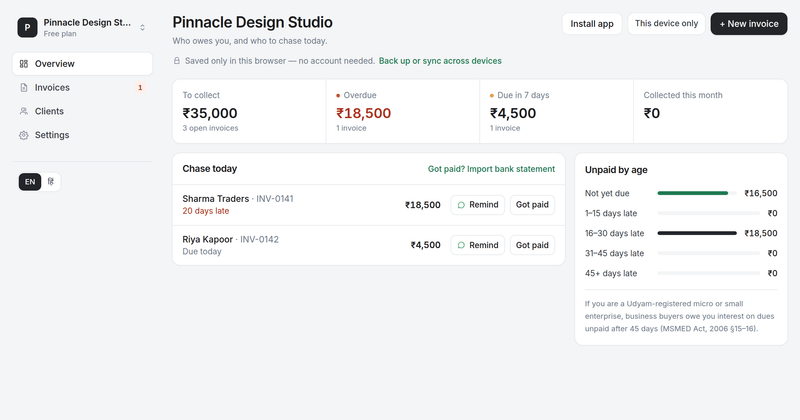
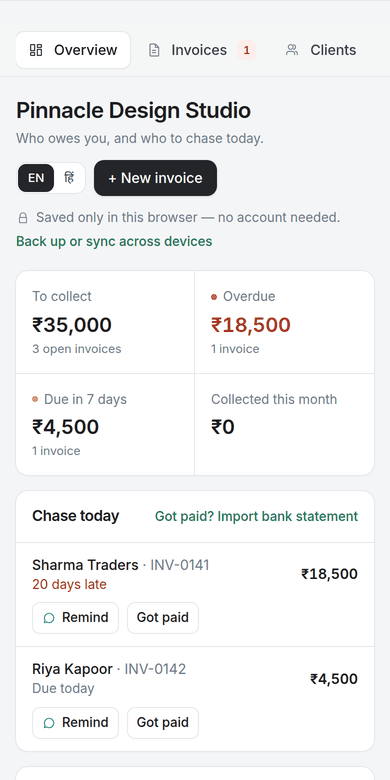
The overview lists overdue invoices first, with totals for what is due, overdue, and collected this month.
Pick a friendly, due-today, overdue, or firm message. It includes the amount, days late, and your UPI ID.
Record full or part payments with mode and UTR. The invoice moves to Paid and the totals update.
A daily “chase today” list sorted by how late and how large each unpaid invoice is.
Tick “Repeat every month” for tuition, rent, gym or maintenance fees and a new invoice appears on the same day each month.
Import your bank's CSV statement and the tracker spots which UPI credits pay which invoices. Confirm in one tap; the file never leaves your browser.
Record advances and instalments with UPI UTR, cash, bank, card, or cheque. Totals are exact to the paisa.
Four ready messages with your UPI ID as plain text — no broken payment links in chat.
Not due, 1–15, 16–30, 31–45, and 45+ days late. The 45-day line matters for MSMED Act interest.
See every client's open amount and overdue amount, then drill into their invoices.
Save a receipt from the free receipt generator and it marks that client's oldest unpaid invoices as paid — no double entry.
Registered on Udyam? Overdue invoices show when the 45-day MSMED deadline passed. Pro adds the Section 16 interest due and your payment rights to reminders.
With a free account, a 9 am notification lists who to chase that day — overdue first, with the top client and amount.
With a free account, share a link that shows the live amount due, a UPI button, and a QR. Clients can send their UTR back.
Invoice in the client's currency (USD, EUR, GBP, AED, AUD, CAD or SGD), share your bank details or PayPal, Wise, Stripe or Razorpay link instead of UPI, and record the rupees your bank credited. Totals stay separate per currency.
A Pro account keeps up to 20 businesses after the first payment, each with its own UPI ID, invoice numbers and pay links. Free keeps 1.
Optional free account syncs phone and laptop. Or stay offline and download a backup or CSV for your accountant.
FAQ
No. The tracker works without an account. Invoices, clients, and payments are saved in your browser's local storage on this device and are not uploaded to Pro UPI QR.
Without an account, data lives in this browser and is removed if you clear site data — use Settings → Download backup. With a free account, the tracker syncs automatically between your phone and laptop, and you can delete the cloud copy at any time.
Pro UPI QR never sits between your customer and your bank, so it can't see your account. Instead, download your bank statement as CSV and import it: the tracker matches UPI credits to open invoices by amount, invoice number, and name, and you confirm them in one tap. The file is read in your browser and never uploaded.
Tapping WhatsApp opens the chat with the message filled in; you press send yourself. If you saved the client's number, the right chat opens directly. Nothing is sent without your tap.
Yes. Add the invoice number, amount, and due date by hand. The tracker only needs what is owed and when — not the full invoice.
Yes. Turn on Clients abroad in Settings and pick the client's currency when you create the invoice; it stays fixed for that invoice. Reminders and pay links show your bank details, or your PayPal, Wise, Stripe or Razorpay link, instead of a UPI ID, and amounts are never converted or added to your rupee totals. If you export services under an LUT and have a GSTIN, the export note with your LUT ARN can be added to reminders and pay pages of invoices you mark as exports.
For Udyam-registered micro and small enterprises, the MSMED Act, 2006 caps agreed credit at 45 days for business buyers and makes late payments carry compound interest at three times the RBI Bank Rate (17.25% a year now). Under the Income-tax Act's 43B(h) rule (carried into the Income-tax Act, 2025 from 1 April 2026), a business buyer can deduct a late payment only in the year it is paid. Add your Udyam number in Settings and overdue invoices show when the deadline passed; Pro adds the interest due and can put these rights in your reminders.
Related tools
Four siblings in this topic — the full inventory lives on the hub.
Price quotes with validity dates, terms, and optional advance QR.
Advance-payment documents with buyer PO reference.
GST, VAT and export invoices for 50 countries, with an embedded UPI QR or payment link.
Friendly, professional, or firm overdue copy for WhatsApp, SMS, email.
Related guides
Picked from the article collection by shared tags.
Issue a real payment receipt after a UPI credit — with UTR, amount, and date. Not a fake PhonePe or GPay screenshot. Free browser PDF for shops and freelancers.
How TReDS lets registered MSMEs convert accepted invoices from large buyers into cash within days — eligibility, discount costs, and the step-by-step flow.
Add a dated PAID stamp with signature to any invoice photo or PDF in your browser. Why proof of payment matters and how small businesses keep clean records.
The difference between quotation, estimate, invoice, and receipt explained with GST rules, numbering conventions, examples, and free generators for each.