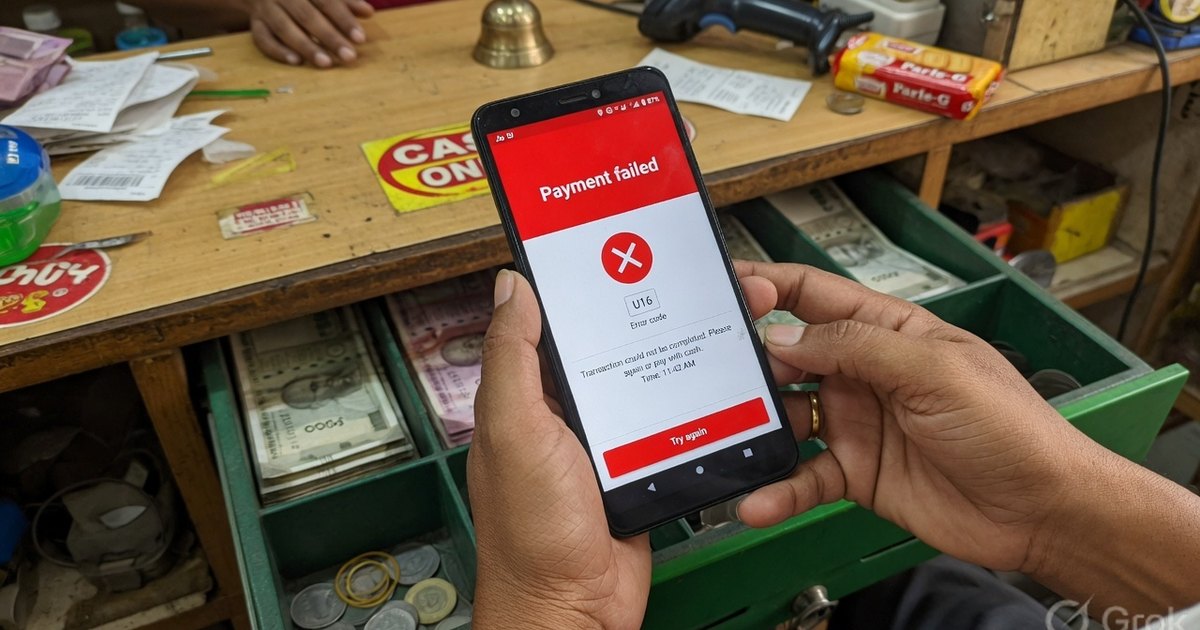
U16Usually no debit
NPCI risk threshold / security block
NPCI switchRisk / securityUsually no debit
Cause: NPCI declined the payment as a transaction-risk (TXNRISK) event. Apps often surface this as “NPCI returned error”. It is a security or velocity check, not a bank outage.
What you should doWait 30–60 minutes before retrying. Do not keep hammering the same payee. If it repeats on every merchant, call the issuing bank and ask whether UPI risk controls are blocking the account.
If you are the merchant: If only some customers fail with U16, the block is on their side. If many fail, pause and verify the VPA has not been flagged.
U30If debited: auto-reversal by T+1 (P2P) or T+5 (P2M)
Debit failed at the remitter bank
Payer's bankBank downDebit possible — check UTR
Cause: The payer's bank could not complete the debit. This is a remitter-side failure, not a daily-limit code (see Z7, Z8, ZU, U03 for limits).
What you should doOpen the transaction and copy the 12-digit UTR. Check the bank SMS/ledger before retrying. If money left the account, wait for auto-reversal — do not pay again.
If you are the merchant: Do not release goods on a U30 until the credit is visible in your ledger or soundbox.
U28If debited: auto-reversal by T+1 / T+5
Bank or PSP technical issue
Payer's bankBank downDebit possible — check UTR
Cause: PhonePe maps U28 to an issuing-bank technical error. Other NPCI tables list it as PSP not available. Either the payer's bank or the app's payment service provider timed out on the switch.
What you should doRetry after 10–15 minutes, ideally on mobile data instead of congested Wi-Fi. If it persists, try a second UPI app linked to the same account.
If you are the merchant: A burst of U28s usually means one bank or PSP is degraded, not your QR.
U09Pending → success or auto-reversal; RBI outer bound T+1 / T+5
Request-auth timeout
UPI app / PSPTimeout / networkIf debited, auto-reversal applies
Cause: The payer's app did not receive an authorisation acknowledgement in time (Reqauth timeout). The payment may sit in pending while banks reconcile.
What you should doDo not retry the same amount until the first UTR shows Failed or the money is back. Check bank SMS, not only the app tile.
If you are the merchant: Treat as pending. Ask the customer for the UTR and search your settlement list.
U66Usually no debit
Device fingerprint mismatch
UPI app / PSPVPA / requestUsually no debit
Cause: The UPI app's device binding does not match NPCI records. Common after a phone change, app reinstall, or rooted/cloned device.
What you should doRe-register UPI on this device: verify the SIM, complete bank OTP, and set/confirm UPI PIN. Then retry.
If you are the merchant: This is almost always on the customer's phone, not the standee.
U69No debit
Collect / payment request expired
Customer / PINVPA / requestUsually no debit
Cause: A collect request or intent timed out before the customer approved it. Nothing moved.
What you should doSend a fresh collect request or ask the customer to scan the QR again. Collect requests are typically valid only for a short window.
If you are the merchant: Generate a new request; do not reuse an expired collect QR or intent.
U90If debited: auto-reversal by T+1 / T+5
Issuing bank delayed the payment
Payer's bankBank downDebit possible — check UTR
Cause: The payer's bank took longer than the UPI timeout to authorise. The app reports a bank technical issue.
What you should doWait and check the UTR. If the bank is on NPCI's downtime list, retry later or use another linked account.
If you are the merchant: Peak hours (10–11 am, salary week) produce clusters of U90/UT on specific banks.
UTIf debited: auto-reversal by T+1 / T+5
Remitter / issuer unavailable (timeout)
Payer's bankTimeout / networkIf debited, auto-reversal applies
Cause: The issuing bank did not respond to NPCI within the timeout window.
What you should doCopy the UTR, check the bank ledger, and only retry after the first attempt is Failed or reversed.
If you are the merchant: Same handling as other timeouts: no double charge, no goods until credit lands.
U54Usually no debit
Transaction ID or amount mismatch
Merchant / requestVPA / requestUsually no debit
Cause: The amount or transaction identifier in the credential block did not match the payment request. Usually a stale intent or a corrupted QR payload.
What you should doGenerate a fresh QR or payment link. Do not reuse an old screenshot. If you typed the amount, confirm it matches the bill.
If you are the merchant: Re-print or re-generate the QR if this repeats on your standee.
U67If debited: auto-reversal by T+1 / T+5
Debit timeout
Payer's bankTimeout / networkIf debited, auto-reversal applies
Cause: The remitter bank accepted the request but did not confirm the debit before NPCI timed out.
What you should doTreat as pending. Check UTR and bank SMS. Do not send a second payment for the same bill.
If you are the merchant: Hold the order until the credit or the reversal is visible.
U03No debit
Per-transaction amount limit exceeded
Customer / PINLimitsUsually no debit
Cause: The amount is higher than the per-transaction cap set by the customer's bank or UPI profile.
What you should doSplit the payment, use another bank account, or raise the bank's UPI per-transaction limit in the bank app if the bank allows it.
If you are the merchant: For hospital, education, and capital-market MCC codes, NPCI allows higher P2M caps — a consumer VPA will still fail.
U80If debited: auto-reversal by T+1 / T+5
Payer PSP technical issue
UPI app / PSPTimeout / networkDebit possible — check UTR
Cause: The customer's UPI app (TPAP/PSP) could not complete the request.
What you should doUpdate the app, switch between Wi-Fi and mobile data, or retry from a bank's own UPI app.
If you are the merchant: If only PhonePe users fail while GPay users succeed, the issue is the payer PSP, not your VPA.
U86If debited: auto-reversal by T+1 / T+5
Issuing bank technical issue
Payer's bankBank downDebit possible — check UTR
Cause: A technical decline at the customer's bank during authorisation.
What you should doRetry later or switch to another linked bank account.
If you are the merchant: Same pattern as U28/U90 — wait, then retry once.
Z9No debit
Insufficient funds in the payer account
Customer / PINBalanceUsually no debit
Cause: The remitter account does not have enough available balance, including uncleared holds.
What you should doCheck available (not ledger) balance in the bank app, including UPI Lite if it was selected. Add funds and retry.
If you are the merchant: Ask the customer to pay a lower amount or use another account. This is not a merchant-QR fault.
IENo debit
Insufficient balance (issuer)
Customer / PINBalanceUsually no debit
Cause: Issuer-side insufficient-funds decline. Functionally the same as Z9.
What you should doAdd funds or pick another account, then retry once.
If you are the merchant: Treat like Z9.
ZMNo debit
Incorrect UPI PIN (MPIN)
Customer / PINPIN & authUsually no debit
Cause: The 4- or 6-digit UPI PIN did not match bank records. This is the PIN error — not U14.
What you should doRe-enter the PIN carefully. After repeated failures the bank will lock UPI (see Z6). Reset PIN from the app using debit-card + OTP if needed.
If you are the merchant: Never offer to “enter PIN for the customer”.
Z6No debit
UPI PIN tries exceeded
Customer / PINPIN & authUsually no debit
Cause: Too many incorrect PIN attempts. The bank has temporarily blocked UPI PIN on that account.
What you should doWait for the bank's cool-off (often up to 24 hours) or reset UPI PIN from the official app. Do not keep retrying.
If you are the merchant: The customer must unlock UPI on their own device.
Z7No debit
Transaction count limit exceeded
Customer / PINLimitsUsually no debit
Cause: The remitting member's daily or periodic frequency cap was hit (number of UPI transactions, not rupees).
What you should doWait for the bank's 24-hour window to reset, or pay from another linked account. See /upi-limits/ for bank-wise counts.
If you are the merchant: High-frequency payers (salary day, tuition) hit Z7 even when the rupee cap is unused.
Z8No debit
Per-transaction limit set by remitting bank
Customer / PINLimitsUsually no debit
Cause: The amount exceeds the per-transaction cap configured by the payer's bank.
What you should doLower the amount, split the bill, or raise the limit in the bank's UPI settings if offered.
If you are the merchant: Large invoices should use a merchant VPA or a non-UPI rail once customer caps are hit.
ZUNo debit
Daily UPI amount limit exceeded
Payer's bankLimitsUsually no debit
Cause: The remitter has exhausted the daily UPI amount cap (bank and NPCI default is typically ₹1,00,000 for consumer VPAs).
What you should doUse another bank account, wait for the daily reset, or for eligible merchant categories use a verified merchant VPA with a higher P2M cap.
If you are the merchant: Incoming P2M on a merchant VPA is not the same cap as a customer's outbound P2P limit.
ZANo debit
Customer declined or cancelled
Customer / PINVPA / requestUsually no debit
Cause: The payer cancelled the payment on the PIN/confirm screen, or the collect was rejected.
What you should doAsk the customer to scan again only if they still intend to pay.
If you are the merchant: Not a QR defect. Confirm they meant to cancel before arguing about the bill.
ZHNo debit
Invalid UPI ID (VPA)
Customer / PINVPA / requestUsually no debit
Cause: The VPA does not exist, is mistyped, or is no longer registered.
What you should doRe-type the UPI ID. If you scanned a printed QR, decode it and confirm the `pa=` value is still active.
If you are the merchant: Reprint the standee if you changed VPA. Old stickers will fail with ZH.
ZGNo debit
VPA restricted by the customer
Customer / PINVPA / requestUsually no debit
Cause: The payer has blocked or restricted payments to this VPA, or the VPA is restricted for this credit type.
What you should doPay from another account/app, or remove the payee restriction in the UPI app if you set it.
If you are the merchant: Rare on a shop QR unless a customer previously marked the VPA as spam.
ZENo debit
Transaction not permitted to this VPA by the PSP
UPI app / PSPVPA / requestUsually no debit
Cause: The payer's PSP will not allow this credit to the destination VPA (policy, product, or MCC restriction).
What you should doTry another UPI app or another destination VPA on the same account.
If you are the merchant: If every customer fails, the merchant VPA may be restricted — contact the PSP that issued it.
ZDUsually no debit
Validation error
Merchant / requestVPA / requestUsually no debit
Cause: NPCI or the PSP rejected the payload as a validation error (malformed request, bad fields).
What you should doGenerate a fresh payment request. If you built the URI yourself, validate `pa`, `pn`, `am`, and encoding.
If you are the merchant: Use a tested generator. Hand-edited URIs are a common ZD source.
YENo debit
Payer account blocked or frozen
Payer's bankAccount statusUsually no debit
Cause: The remitting account is blocked or frozen by the bank (KYC, lien, deceased, court order, or fraud hold).
What you should doThe customer must visit the bank or complete pending KYC. UPI cannot override a freeze.
If you are the merchant: Accept another account or a different rail. Do not retry.
YFNo debit on payer; credit never posted
Beneficiary account blocked or frozen
Payee's bankAccount statusUsually no debit
Cause: The merchant/payee account cannot receive credits.
What you should doMerchant: call the bank that holds the settlement account. Confirm KYC, freeze, and UPI credit flags.
If you are the merchant: This is your problem, not the customer's. Take the QR down until the bank clears the freeze.
ZXNo debit
Payer account inactive or dormant
Customer / PINAccount statusUsually no debit
Cause: The remitting account is inactive or dormant.
What you should doReactivate the account at the bank, then re-link UPI.
If you are the merchant: Customer-side only.
ZYNo credit
Beneficiary account inactive or dormant
Payee's bankAccount statusUsually no debit
Cause: The payee settlement account is dormant, so credits are refused.
What you should doMerchant must reactivate the current/savings account used for UPI settlement.
If you are the merchant: Take the QR down. Incoming UPI will keep failing until the bank marks the account active.
XHNo debit
Payer account does not exist
Customer / PINAccount statusUsually no debit
Cause: The remitter account number mapped to UPI is invalid or closed.
What you should doRe-link a live bank account in the UPI app and complete registration again.
If you are the merchant: Customer must fix their UPI mapping.
XINo credit
Beneficiary account does not exist
Payee's bankAccount statusUsually no debit
Cause: The account behind the payee VPA is closed or was never valid.
What you should doMerchant: verify the VPA still maps to an open account. Create a new VPA if the old account was closed.
If you are the merchant: Reprint every standee after a VPA change.
XYIf debited: auto-reversal by T+1 / T+5
Remitter CBS offline
Payer's bankBank downDebit possible — check UTR
Cause: The payer bank's core banking system is offline or unreachable from NPCI.
What you should doWait for the bank to recover. Check NPCI/bank status. Use another account if urgent.
If you are the merchant: A wave of XY/Y1 on one bank is an outage, not a bad QR.
XBIf debited: auto-reversal by T+1 / T+5
Remitter bank unavailable
Payer's bankBank downDebit possible — check UTR
Cause: The payer's bank is down or not accepting UPI at this moment.
What you should doRetry later or switch accounts. Keep the UTR if a debit SMS arrives.
If you are the merchant: Offer to wait or accept another app/account.
Y1If the payer was debited: auto-reversal by T+1 / T+5
Beneficiary CBS offline
Payee's bankBank downIf debited, auto-reversal applies
Cause: The payee bank's core system is offline, so the credit cannot post.
What you should doMerchant: check with the settlement bank. Customer: keep the UTR and do not retry until reversal or credit.
If you are the merchant: If your bank's CBS is down, all incoming UPI will fail. Announce cash/alternate VPA.
BTIf debited: auto-reversal by T+1 / T+5
Acquirer / beneficiary unavailable (timeout)
Payee's bankTimeout / networkIf debited, auto-reversal applies
Cause: The beneficiary bank or acquirer did not answer NPCI in time.
What you should doWait on the first UTR. Only retry after Failed/reversed.
If you are the merchant: Timeouts on your bank look like “pending” to the customer. Confirm in your ledger, not their screenshot.
AMNo debit
UPI PIN not set
Customer / PINPIN & authUsually no debit
Cause: The customer has not created a UPI PIN on this account/device.
What you should doSet UPI PIN in the app (debit card + OTP, or the bank's documented method), then retry.
If you are the merchant: First-time UPI users hit this at the counter. Give them a minute.
B1No debit
Registered mobile number changed
Customer / PINAccount statusUsually no debit
Cause: The mobile number mapped to the bank account was changed or removed, so UPI device binding is invalid.
What you should doUpdate the mobile number at the bank, then re-register UPI on the new SIM. Old device bindings will keep failing.
If you are the merchant: Customer-side SIM/KYC issue.
B3No debit
Transaction not permitted to this account
Customer / PINAccount statusUsually no debit
Cause: The account type or product does not allow this UPI debit (NRE, certain overdraft, or bank product restriction).
What you should doUse a supported savings/current account. Confirm with the bank which accounts are UPI-enabled.
If you are the merchant: Not a QR problem.
K1Usually no debit
Suspected fraud — remitter bank declined
Payer's bankRisk / securityUsually no debit
Cause: The payer's bank's fraud engine blocked the debit.
What you should doThe customer should call the bank's fraud desk. Retrying can extend the block. Use another account only if the bank says it is safe.
If you are the merchant: Do not coach the customer to bypass a fraud decline.
FPNo debit
Payer account frozen
Payer's bankAccount statusUsually no debit
Cause: Issuer reports the account as frozen.
What you should doCustomer must clear the freeze with the bank (KYC, lien, or investigation).
If you are the merchant: Same handling as YE.
XPUsually no debit
Remitter bank blocked the payment
Payer's bankRisk / securityUsually no debit
Cause: Issuing-bank policy block (not necessarily a freeze) — product, geography, or rule-engine decline.
What you should doCustomer contacts the issuing bank and asks why UPI was declined.
If you are the merchant: If only one bank's customers fail, it is that bank's rule, not your MCC.
XVUsually no debit
Issuing bank blocked the payment
Payer's bankRisk / securityUsually no debit
Cause: Another issuer-side block code used by some PSPs for the same class of decline as XP.
What you should doCall the issuing bank. Do not keep retrying.
If you are the merchant: Treat like XP/K1.