
Paytm vs PhonePe vs Google Pay: Best QR for Your Shop
Compare Paytm, PhonePe, and Google Pay business QR codes on charges, limits, and soundbox costs. Learn why a universal QR might be your best choice.
For Indian shop owners, deciding which payment QR code standee to display on the billing counter is a critical decision. You’ve likely seen shops cluttered with multiple standees: one for Paytm, one for PhonePe, and one for Google Pay (GPay).
In this comprehensive guide, we compare Paytm, PhonePe, and Google Pay merchant features side-by-side. You will learn about their MDR (fees), settlement timelines, daily limits, soundbox charges, and how a single Universal UPI QR can replace all of them.
Executive Summary: Google Pay vs PhonePe vs Paytm
If you are looking for a quick decision:
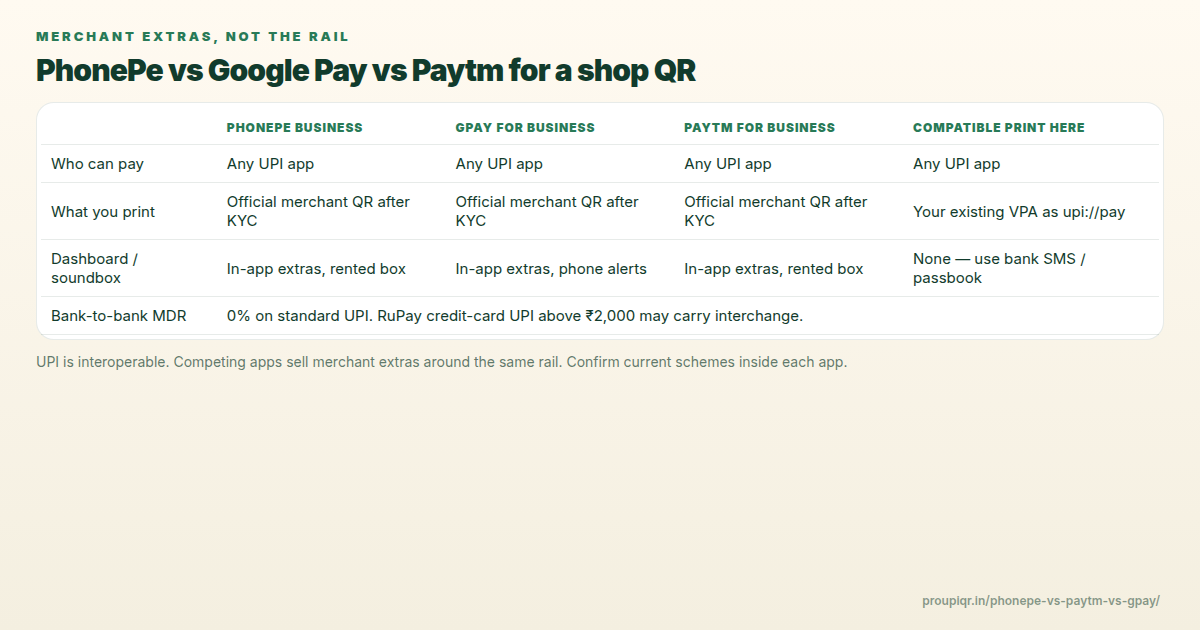
- Interoperability: Every standard UPI QR code is fully interoperable. A single QR can accept payments from GPay, PhonePe, Paytm, BHIM, and 80+ banking apps.
- Transaction Fees: Bank-to-bank UPI transactions have 0% MDR (Zero fees) at any amount. RuPay credit card on UPI has 0% MDR under ₹2,000; interchange applies above ₹2,000 per NPCI circulars.
- Best for Storefront Visibility: Google Pay is excellent for local SEO, placing your shop on Google Maps.
- Best for Audio Alerts: PhonePe and Paytm are neck-and-neck with soundbox offerings, though PhonePe features lower rental schemes in many regions.
Side-by-Side Comparison Table
Here is a detailed comparison of the merchant offerings for Google Pay for Business, PhonePe Business, and Paytm for Business:
| Feature / Metric | Google Pay Business (GPay) | PhonePe Business | Paytm Business |
|---|---|---|---|
| Merchant App | GPay for Business | PhonePe Business | Paytm for Business |
| Setup Fee | ₹0 (Free) | ₹0 (Free) | ₹0 (Free) |
| MDR (Bank Account) | 0% | 0% | 0% |
| MDR (Rupay Credit Card) | 0% under ₹2,000 | 0% under ₹2,000 | 0% under ₹2,000 |
| Settlement Time | Instant (Direct to Bank) | Instant or Next-Day | Instant or Next-Day |
| Daily Inbound Limit | Up to ₹1-2 Lakhs (default) | Up to ₹1-2 Lakhs (default) | Up to ₹1-2 Lakhs (default) |
| Audio Alerts | GPay Soundpod (select cities) | PhonePe Smartbox (widely available) | Paytm Soundbox (pioneer, widely available) |
| Soundbox Monthly Rental | ~₹99 - ₹125 / month | ~₹49 - ₹120 / month | ~₹99 - ₹150 / month |
| Local Discovery | Yes (Google Maps integration) | Yes (PhonePe Switch/Stores) | Yes (Paytm Near Buy) |
Detailed Feature Deep-Dive
1. Google Pay for Business (GPay)
Google Pay is a strong option for merchant setups because of its integration with the Google ecosystem.
- Local SEO Benefit: Setting up a GPay Business profile automatically lists your shop on Google Maps, helping you gain organic search footfall from users searching for “shops near me”.
- Settlement: Google Pay settles payments instantly. Funds go directly to your linked bank account via peer-to-peer (P2P) or peer-to-merchant (P2M) transfer rails.
- Soundbox Option: GPay offers “Google Pay Soundpod” in selected cities with dynamic voice notifications.
Guide: How to activate Google Pay Business QR
2. PhonePe Business
PhonePe is currently India’s market leader in UPI transaction volume.
- High Customer Trust: Because a massive percentage of UPI users run PhonePe, having a PhonePe branded sticker gives consumers familiarity.
- PhonePe Smartbox: PhonePe’s audio box is highly reliable and is offered with flexible rental plans (often starting at ₹49/month or waived during promotional periods).
- Instant Settlements: PhonePe allows manual settlement trigger (“Settle Now”) in the merchant app for real-time clearance, otherwise settles overnight by default.
Guide: How to activate PhonePe Business QR
3. Paytm for Business
Paytm is the pioneer of QR payments and audio soundboxes in India.
- Soundbox Ecosystem: Paytm offers the most advanced soundboxes, including versions with calculator keypads, LCD screens showing transaction amounts, and multi-language support.
- Paytm Business Dashboard: Offers comprehensive bookkeeping, loan eligibility tracking, and vendor payout solutions.
- Settlement Modes: Supports instant settlement, twice-a-day settlement, or next-morning settlement.
Guide: Compare Paytm Soundbox Rental & Security Charges
The Smart Solution: One Universal UPI QR Standee
Displaying three separate stickers takes up valuable counter space and creates payment confusion. Worse, it increases your surface area for fraud (scammers swapping one of your QRs with theirs).
Because UPI is fully interoperable, you can generate a single, clean, professional payment poster that accepts all payment apps:
- Get your VPA: Locate your UPI VPA (e.g.
shopname@okicicior9876543210@ybl) from any of your active banking or business apps. - Build your Poster: Use the free Pro UPI QR Generator to create an eye-catching checkout poster.
- Select a Template: Choose a preset like Shop Payment Standee or Custom Minimalist Card.
- Download & Print: Save as PNG, print on photo paper, and insert into an acrylic stand.
This single standee can accept payments from Paytm, PhonePe, Google Pay, BHIM, Cred, and any mobile banking application.
If you prefer brand-aligned color schemes, you can use our free preset generators:
Frequently Asked Questions
Q1. Is there any commission or charge on UPI QR code payments?
No. For standard UPI transactions funded by bank accounts, there is 0% Merchant Discount Rate (MDR). Both you and the customer pay ₹0 fees. For RuPay credit card payments via UPI, MDR is 0% for transactions up to ₹2,000; interchange applies above ₹2,000 per NPCI guidelines.
Q2. Can a customer scan a PhonePe QR using the GPay app?
Yes, absolutely. Since all these apps comply with the NPCI interoperability framework, a PhonePe merchant QR can be scanned by Google Pay, Paytm, BHIM, or any bank UPI app.
Q3. How do I prevent QR code standee tampering and fraud?
Displaying a single, custom-designed QR with your shop’s official name makes it easy for you and your customers to verify the payee name during checkout. Check out our guide on preventing QR tampering and billing scams.
Build a free Universal UPI QR Standee →
Related comparisons: Static vs Dynamic QR Codes · Creating a QR Without a Business Account
Want the quick verdict instead of the deep dive? See our PhonePe vs Paytm vs GPay merchant comparison page — feature table, situation-based picks, and a free universal QR generator.
Kunal Siyag
Founder, Pro UPI QR
Founder of Pro UPI QR. Builds the generators and calculators, writes the merchant guides, and cites NPCI, RBI, and bank sources instead of inventing a research team.
Related Articles
UPI QR Code vs Payment Gateway for Business
An in-depth comparison of free static UPI QR codes and paid payment gateways (like Razorpay, Cashfree, or Paytm Business) for small merchants and online creators.
RBI & NPCI Merchant UPI QR Display Guidelines for Indian Shops
What Indian merchants should know about UPI QR display, soundbox usage, MDR rules, and customer transparency — in plain language.
P2M Meaning in Banking and UPI Payments
P2M is person-to-merchant UPI. P2P is person-to-person. Learn the difference, refund TAT, MDR, and when a shop should use a merchant VPA instead of a personal UPI ID.
Related tools
Four siblings in this topic — the full inventory lives on the hub.
PhonePe vs Paytm vs GPay
Interoperability, soundboxes, dashboards, and what actually differs.
PhonePe-compatible QR
Print a PhonePe-styled standee for any VPA.
Google Pay-compatible QR
GPay-friendly poster customers can scan from any UPI app.
Paytm-compatible QR
Paytm-styled counter QR for shops and local businesses.